DIY hardware · Game Boy Advance
GB-Link adapter
A Raspberry Pi Pico + a link cable, about $10 in parts
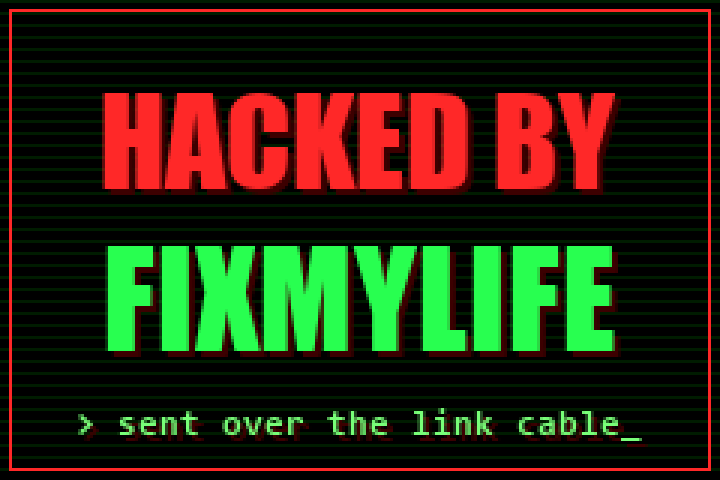
A Raspberry Pi Pico wired to a Game Boy link cable becomes a USB adapter for your GBA. With the free GB-Link firmware and a browser, it can send games to a GBA with no cartridge, trade Pokémon online, play Advance Wars over the internet and more. The screen above is our own test program, sent over the cable.
Build it in three steps
You need a Raspberry Pi Pico (RP2040), a Game Boy Color link cable, a soldering iron and a multimeter.
Wire the cable to the Pico
Cut one plug off the link cable and solder its six wires plus the shield to the Pico (see Wiring below).
Flash the firmware
Hold BOOTSEL while plugging the Pico in, then copy the
gblink.uf2file from the releases page onto theRPI-RP2drive.Send something to the GBA
Use the multiboot sender on this page (in Chrome or Edge) with our test screen, and turn on the GBA with no cartridge in.
01 · What you need
Parts
| Part | Notes |
|---|---|
| Raspberry Pi Pico (RP2040) | The original 2020 Pico or a Pico W. An RP2040-Zero also works and has the status LED built in. A Pico 2 (RP2350) does not work. |
| Game Boy Color link cable | A generic GBC-style cable with six wires. The multiboot tool needs this type, not the GBA cable with the grey hub. |
| Multimeter | With a continuity (beep) mode, to find out which wire is which. |
| Soldering iron and heat-shrink | To join the wires to the Pico and cover each joint. |
GBA only, unless you add a level shifter
The GBA's link port runs at 3.3V, the same as the Pico, so it can be wired directly. An original Game Boy or Game Boy Color uses 5V, which can damage the Pico. For those, add a bi-directional level shifter, as on the GB-Link USB DIY board.
02 · Soldering
Wiring
Looking at the end of a link cable plug, the top row is pins 1 3 5 and the bottom row is 2 4 6. Wire colours are not standard, so find yours with a multimeter: beep each pin in the plug you cut off against the bare wire ends, and write the colours down.
| Plug pin | Signal | Pico pin |
|---|---|---|
| 5 | SC (clock) | GP0 (pin 1) |
| 3 | SI | GP1 (pin 2) |
| 2 | SO | GP2 (pin 4) |
| 4 | SD | GP3 (pin 5) |
| 1 | SD2 | GP4 (pin 6) |
| 6 | GND | GND (pin 3) |
| Shell | Shield | GND |
This is the wiring used by the GB-Link firmware and the GB-Link USB DIY board. The firmware reads on GP1 and sends on GP2, and GBC cables cross the two data wires inside. Depending on which plug you numbered, they can end up the wrong way round, so if nothing works, swap the wires on GP1 and GP2 first.
Our cable, for example
Blue on GP0, brown on GP1, green on GP2, yellow on GP3, orange on GP4, and red and black on GND. We first had brown and green the other way round, and swapping them was the fix.
Red can be ground
On our cable the red wire was ground. To find ground for sure, plug the cable into the GBA (turned off), touch one probe to the battery minus (–) spring and beep the wires. Never connect 3.3V or 5V to plug pin 1.
Add a reset button
A push button between RUN (pin 30) and GND (pin 28) restarts the Pico without unplugging it. Hold BOOTSEL and tap it to get back into flashing mode.
03 · Software
Flash the firmware
Download the firmware
Get
gblink.v2.2.3.uf2(or newer) from the GB-Link releases page.Put the Pico in flashing mode
Hold BOOTSEL on the Pico while plugging it into your computer. A drive called
RPI-RP2appears.Copy the file
Drag the
.uf2onto the drive. The Pico restarts by itself and shows up as GBLink USB.
04 · First boot
Put something on the GBA screen
The GBA can start a small program sent over the link cable when no cartridge is inserted. This is called multiboot. Our test screen is a 75 KB program that shows HACKED BY FIXMYLIFE. It's a quick way to prove your wiring works.
Open this page in Chrome or Edge
On a computer or an Android phone. Other browsers can't talk to USB devices.
Pick a program and connect
Click Or use our test screen below (or drop in your own
.gbafile), then click Connect USB and choose GBLink USB.Send it
Take the cartridge out of the GBA and connect the cable. Click Send to GBA, then turn the GBA on. The screen appears after a few seconds.
1 · Program
2 · Adapter
3 · Log
Based on GB-Link Multiboot Web (GPL-3.0).
If it doesn't work
| The log says | What it means |
|---|---|
got 0xffffffff on every poll | Nothing is coming back from the GBA. Swap the wires on GP1 and GP2, check the ground wire, and make sure no cartridge is inserted. |
| Nothing in the device list | The Pico isn't running the firmware. Flash the .uf2 again, and use Chrome or Edge. |
| Transfer starts, then fails | A loose plug or solder joint. Push the plugs in fully and check each joint. |
05 · Mega Man Battle Network
Use it as a Battle Chip Gate
The adapter can pretend to be the Battle Chip Gate accessory, so you can insert chips from this page instead of plastic chips. The list below has the Navi chips for Rockman EXE 4.5: Real Operation; any other chip works by typing its ID.
Needs firmware v2.2.8 or newer
Chip Gate mode is in the GB-Link v2.2.8 pre-release. Flash gblink.v2.2.8.uf2 from the releases page the same way as before.
Connect before turning on the GBA
Pick the gate for your game, click Connect USB and choose GBLink USB. Then turn on (or reset) the GBA with the game in.
Insert a chip
When the game sees the gate, enter a battle and click a chip. To use another, just click it; the old chip is pulled out first so the game notices the new one.
1 · Gate
2 · Adapter
3 · Insert a chip
4 · Log
06 · Next
What else it can do
Everything runs in the browser from the GB-Link launcher. Put the game cartridge in and pick its tool; only multiboot needs the cartridge out.
Gen 3
Pokémon trades online
Trade and battle with other people in Ruby, Sapphire, Emerald, FireRed and LeafGreen.
Pokémon
Events and Wonder Cards
Receive old Mystery Gift events and event Pokémon on a real cartridge.
1 and 2
Advance Wars online
Play head-to-head over the internet on real hardware.
Emulation
e-Reader
Send e-Reader card data to your GBA without the e-Reader or the cards.
Needs a level shifter
Game Boy Printer
Save Game Boy Camera photos and other prints as image files.
07 · Downloads
Links
- GB-Link firmware releasesgithub.com/GB-Link/GBLink-Firmware/releases/latestThe gblink .uf2 file to flash onto the Pico
- GB-Link launcherlauncher.gblink.ioEvery game and tool that works with the adapter
- GB-Link USB Multibootmultiboot.gblink.ioSends .gba files to a GBA with no cartridge
- GB-Link firmwaregithub.com/GB-Link/GBLink-FirmwareSource code and the USB command list
- GB-Link USB DIY boardgithub.com/GB-Link/GB-Link-USB-DIYA ready-made PCB with a level shifter for Game Boy and Game Boy Color
- Pico Zero link boardgithub.com/weimanc/game-boy-zero-link-boardA smaller PCB for the RP2040-Zero